Pixel:
The term "pixel" is actually short for "Picture Element." These small little dots are what make up the images on computer displays, whether they are flat-screen (LCD) or tube (CRT) monitors. The screen is divided up into a matrix of thousands or even millions of pixels. Typically, you cannot see the individual pixels, because they are so small. This is a good thing, because most people prefer to look at smooth, clear images rather than blocky, "pixelated" ones. However, if you set your monitor to a low resolution, such as 640x480 and look closely at your screen, you will may be able to see the individual pixels. As you may have guessed, a resolution of 640x480 is comprised of a matrix of 640 by 480 pixels, or 307,200 in all.
Source: http://www.techterms.com/definition/pixel
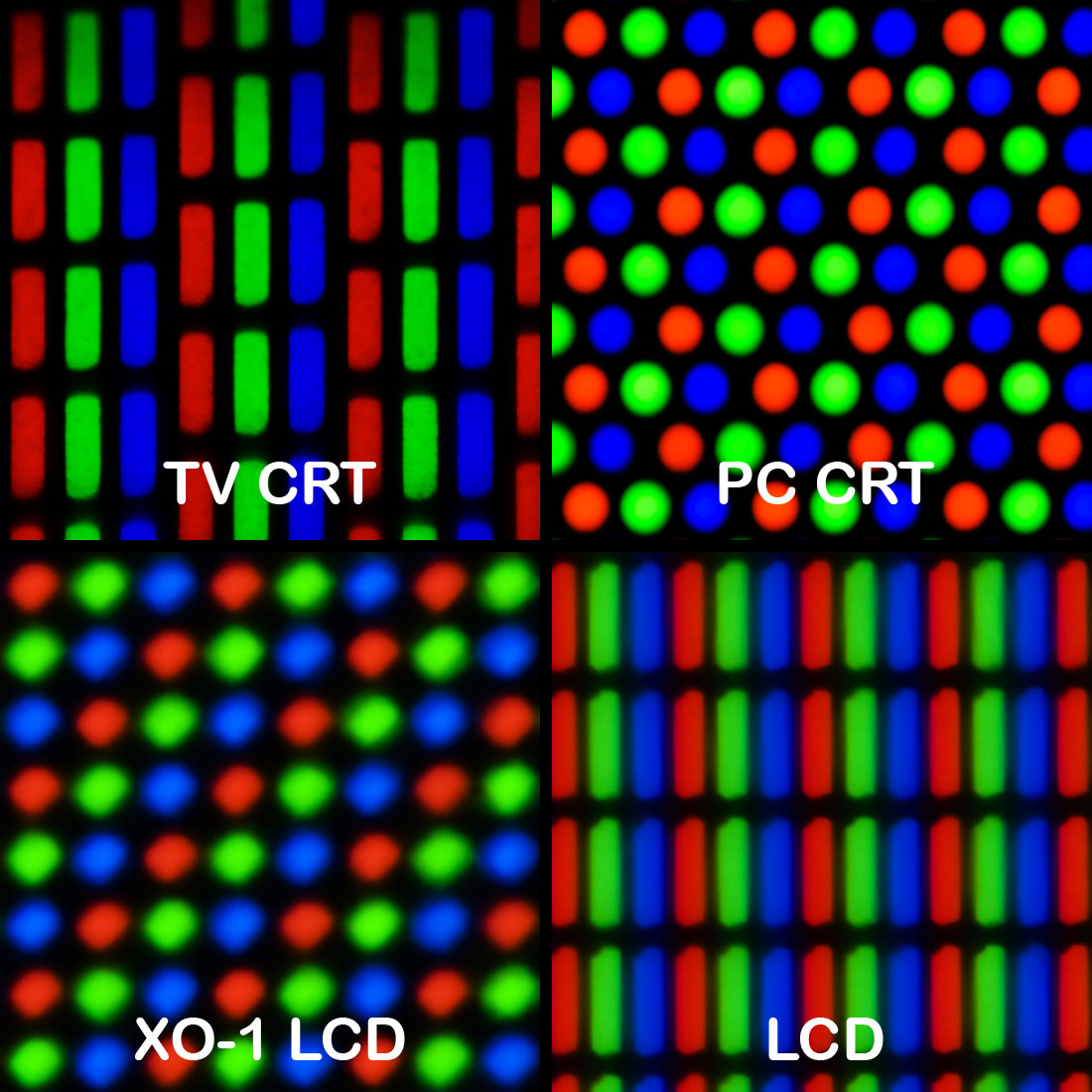
Source: http://en.wikipedia.org/wiki/Pixel

Source: http://www.sciencebuddies.org/science-fair-projects/project_ideas/Games_p015.shtml
Colour Models:

In contrast, display devices generally use a different colour model called RGB, which stands for Red-Green-Blue. One of the most difficult aspects of desktop publishing in colour is colour matching -- properly converting the RGB colours into CMYK colours so that what gets printed looks the same as what appears on the monitor.
However, RGB is much more superior to CMYK as mostly all of the very vibrant and luminous colours produced by RGB can simply not be recreated by the colour model CMYK as their colours turn out to be darker due to the amount of colour being added each time. RGB can produce 16,777,216 colours whereas CMYK can only produce about 60-70% of that.
Text Source: http://www.webopedia.com/TERM/C/CMYK.html
Image Source: http://www.examiner.com/article/understanding-rgb-vs-cmyk

Resolution:
In computers, resolution is the number of pixels (individual points of colour) contained on a display monitor, expressed in terms of the number of pixels on the horizontal axis and the number on the vertical axis. The sharpness of the image on a display depends on the resolution and the size of the monitor. The same pixel resolution will be sharper on a smaller monitor and gradually lose sharpness on larger monitors because the same number of pixels are being spread out over a larger number of inches.
Text Source: http://whatis.techtarget.com/definition/resolution
Image Source: http://kevinsdigitalgraphics.blogspot.co.uk/p/resolutioncolour-depth.html
Resolution also depends of other things such as the distance you are away from the screen because the closer you are sat the more you will be able to see that the curves and smooth edges look more block like due to the resolution that the image is meant to have compared to the resolution that your screen can handle. Often when smaller images are blown up to look larger the resolution becomes worse because you have the same amount of pixels but they are just being stretched out to fill the space meaning you will have less pixels per inch then what was initially intended.
Raster Images:
Raster images are made up of a set grid of dots called pixels where each pixel is assigned a colour value. Unlike a vector image, raster images are resolution dependent. When you change the size of a raster image, you shrink or stretch the pixels themselves which can result in a significant loss of clarity and very blurry image.

Raster images can use a range of file formats such as psd, bmp, gif, tiff, jpg and png.
Vector Image:
1. psd stands for Photoshop Document and this is the default file extension when using Photoshop. It stores and image with support for most imaging options available in Photoshop.
2. bmp stands for bitmap image file is a raster graphics image file format used to store bitmap digital images. The bmp file format is capable of storing 2D digital images.
3. gif stands for graphics interchange format and it is a bitmap image format which is why it is used for raster images often.
g 4. tiff stands for tagged image file format and is used to store raster graphics, popular among graphic artists, the publishing industry, and both amateur and professional photographers in general.
5. jpg (joint photographic experts group) file extension, pronounced Jay Peg. This is the right format for those images which must be very small e.g. for websites or an Email.
6. PNG files were developed to build upon the purpose of gifs. Designers need the ability to incorporate low-resolution images that load quickly but also look great, too.
Image and Top Text Source: http://99designs.com/designer-blog/2011/05/02/vector-vs-raster-images/
Sources: 1.http://en.wikipedia.org/wiki/Adobe_Photoshop
2.http://en.wikipedia.org/wiki/BMP_file_format
3.http://en.wikipedia.org/wiki/Graphics_Interchange_Format
4.http://en.wikipedia.org/wiki/Tagged_Image_File_Format
5.http://www.scantips.com/basics9j.html
6.http://www.sitepoint.com/gif-jpg-png-whats-difference/
6. PNG files were developed to build upon the purpose of gifs. Designers need the ability to incorporate low-resolution images that load quickly but also look great, too.
Image and Top Text Source: http://99designs.com/designer-blog/2011/05/02/vector-vs-raster-images/
Sources: 1.http://en.wikipedia.org/wiki/Adobe_Photoshop
2.http://en.wikipedia.org/wiki/BMP_file_format
3.http://en.wikipedia.org/wiki/Graphics_Interchange_Format
4.http://en.wikipedia.org/wiki/Tagged_Image_File_Format
5.http://www.scantips.com/basics9j.html
6.http://www.sitepoint.com/gif-jpg-png-whats-difference/
Vector images are made up of basic geometric shapes such as points, lines and curves. The relationship of the shapes is expressed as a mathematical equation which allows the image to scale up or down in size without losing quality. Logo designs andprint work such as brochures and posters should be designed as vector images using vector drawing software like Adobe Illustrator, Corel Draw or Inkscape.

Vector images can be saved as a variety of file formats such as eps, wmf, fla, svg and ai.
1. EPS is a file extension for a graphics file format used in vector-based images in Adobe Illustrator. EPS stands for Encapsulated PostScript. An EPS file can contain text as well as graphics. It also usually contains a bit map version of the image for simpler viewing rather than the vector instructions to draw the image.
2. Windows Metafile (WMF) is an image file format originally designed for Microsoft Windows in the 1990s. Windows Metafiles are intended to be portable between applications and may contain both vector graphics and bitmap components.
3. svg is Short for Scalable Vector Graphics, a vector graphics file format that enables two-dimensional images to be displayed in XML pages on the Web.
4. Adobe Illustrator Artwork (AI) is a proprietary file format developed by Adobe Systems for representing single-page vector-based drawings in either the EPS or PDF formats. The .ai filename extension is used byAdobe Illustrator.
5. The FLA extension, which is also commonly used as FLAC, means Free Lossless Audio Codec. Similar to a .ZIP file that reduces large text or graphic files to a more manageable size for easy storage and sharing, the FLAC file is an open-source format that compresses audio without any loss in quality.
Sources: 1.http://whatis.techtarget.com/fileformat/EPS-Encapsulated-Postscript-Vector-graphics-Adobe-Illustrator
2. http://en.wikipedia.org/wiki/Windows_Metafile
3.http://www.webopedia.com/TERM/S/SVG.html
4.http://en.wikipedia.org/wiki/Adobe_Illustrator_Artwork
5.http://www.ehow.com/facts_7468739_file-extension-fla_.html
Image and Top Text Source: http://99designs.com/designer-blog/2011/05/02/vector-vs-raster-images
PDF (Portable Document Format) is a file format that has captured all the elements of a printed document as an electronic image that you can view, navigate, print, or forward to someone else. PDF files are especially useful for documents such as magazine articles, product brochures, or flyers in which you want to preserve the original graphic appearance online. A PDF file contains one or more page images, each of which you can zoom in on or out from. You can page forward and backward.
Source: http://whatis.techtarget.com/definition/Portable-Document-Format-PDF
Positives:
Multiplatform — You can view and interact with PDFs on virtually any platform, including Windows®, Mac OS, and mobile platforms including Android™ and iOS for iPhone and iPad.
Accessible — Over time, the PDF specification has been expanded to work with assistive technologies, making PDF files more accessible to people with disabilities such as low vision or blindness.
Rich in file integrity — PDFs look just like the originals and preserve all the source file information, even when text, drawings, videos, audio, 3D maps, full-color graphics, photos, and business logic are combined in a single file or PDF Portfolio.
Source: http://www.adobe.com/uk/products/acrobat/adobepdf.html
These are just some of the reasons why the PDF file format is used for cross platform images and files.
Compression:
File compression software looks for redundancies in a computer file's code, and eliminates those redundancies in order to reduce the size of the file. Most computer files have a lot of the same information listed over and over again, just like a sentence reuses many of the same letters and words -- such as vowels or "the" and "and" -- to express a complete thought. Compression software uses mathematical algorithms to catalog repeated pieces of information in a file, and then refers back to that information whenever it's needed. The result is a smaller file. Imagine needing to use "and" only once in a paragraph that has eight separate "ands" and you begin to get the idea.
All kinds of files can be compressed: Audio files, video files and still images each can be made smaller using a variety of algorithms. There are, broadly, two forms of compression: lossless and lossy.
Lossy Compression:
 Lossy compression can't be used to compress anything that needs to be reproduced exactly -- it can't just toss out redundant pieces and hope to program will still work. Instead, lossy compression will more often be used with data that is open to some level of human interpretation, such as an image, where the results can be "fudged" the tiniest bit so that files can get smaller without, in theory, anyone noticing. The digital cameras we use today, for example, offer varying levels of compression -- in effect reworking the data of an image, throwing out whatever it can to reduce the image size while still retaining the snazzy picture you thought you took.
Lossless Compression:
Lossless compression recreates a compressed file as an identical match to its original form. All lossless compression uses techniques to break up a file into smaller segments, for storage or transmission, that get reassembled later. Lossless compression is used for files, such as applications, that need to be reproduced exactly like the original file. Lossy compression, on the other hand, eliminates repeated or "unnecessary" pieces of data, as we discussed above. When such a file is decompressed, you get the compression software's re-interpretation of the original file.
Text Source: http://curiosity.discovery.com/question/difference-between-lossless-lossy-compression
Image Source: http://st-julians-computer-science-2010.wikispaces.com/3.4+Networked+computer+systems
Image Capture Devices:
Any device which has a lens is able to capture an image such as a smartphone, a tablet, a digital camera and a scanner. Although they may all look different they all function in the same way by using a lens which captures the light and the light then hits the light detector. This then turns it into pixels and further into an image that can be stored.
Optimizing a graphic means converting an image file to a type that can be displayed in a web page and reducing the file size of an image so that it is small enough to be easily sent or received electronically e.g. downloaded as part of a web page.
Source: http://www.nigelbuckner.com/downloads/handouts/web/Optimising%20graphics.pdf
Optimizing is also when you make the best out of an image depending on what it is going to be used for. If an image is going to be put on a website then it will need to be compressed but keep its quality so hat it loads quickly over the internet and looks good. However if it was going to be used for print then the image would be larger as it doesn't need to load up quickly but has to be of good quality when blown up onto a large piece of print paper. This can include re-sizing, cropping and
Storage and Asset Management:
This video explains what Digital Asset Management is and why it is used.
Source: http://explainingcomputers.com/storage.html
Asset Management is also when you ensure that you save your work correctly with an appropriate name so that it easy to find and also that it isn't in an obscure file that you don't know where it is. It also involves saving your files and work efficiently meaning that you have a backup incase of viruses or folders becoming corrupt.

No comments:
Post a Comment